Overview:

 ·
First
double click on vendor ID box
·
First
double click on vendor ID box

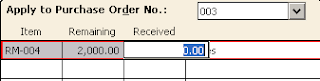 After edited this tab you will write the amount of
receipts goods in receipts option.Goods may receipt according to purchase order
tab or more from it, In this case these changing apply on other tab name as
‘Apply to purchase Tab’.
After edited this tab you will write the amount of
receipts goods in receipts option.Goods may receipt according to purchase order
tab or more from it, In this case these changing apply on other tab name as
‘Apply to purchase Tab’.

When company received inventories then you need to
record purchase receipts. Note purchase goods directly or through maintaining
purchase order. If company directly purchases then you will use ‘apply to
purchase’ tab and if company purchase though purchase order then you will use
‘apply to purchase order’ tab.
Step
1:
First you will click on
task option from menu bar and select purchase/receipts inventory. A window will
appear which mention below
Step
2:
Select or maintain
vendor:
When window appear you
first select customer or maintain new customer from vendor ID. If customer does
not exist already then you need to prepare vendor first from maintaining vendor
account window you can open this window with different method some mention
below
·
First
double click on vendor ID box
·
OR when cursor in Vendor ID box by
pressing Enter key.
1.
Apply
to purchase order Tab:
When you select the already customer and type
particular purchase order no. then Apply to sale tab will automatically edited.
First
you need to select purcahse order number from the PO option.
Record
Items:
 After edited this tab you will write the amount of
receipts goods in receipts option.Goods may receipt according to purchase order
tab or more from it, In this case these changing apply on other tab name as
‘Apply to purchase Tab’.
After edited this tab you will write the amount of
receipts goods in receipts option.Goods may receipt according to purchase order
tab or more from it, In this case these changing apply on other tab name as
‘Apply to purchase Tab’.
2. Apply to purchases Tab:
In this tab you will record those receipts which
receive other then purcahse order. For example your company issue purchase
order on start on the month after this it purchase good on urgently bases with
out issueing purchase order, In this case you will need to use this tab.



